A patchy lawn doesn’t lie. When some sections stay brown while others flood after a short rain, the problem usually isn’t the grass—it’s the water. Too much in one spot, not enough in another, and the results show up fast. That’s where professional irrigation comes in, and why more homeowners are making it a priority rather than an afterthought.
At Weed Pro Lawn Care, irrigation isn’t just an add-on service. It’s the foundation of a healthy, thriving lawn—and getting it right makes everything else work better.
What Makes Professional Irrigation Different From DIY Solutions?
Garden hoses and basic sprinklers can keep a lawn alive. But keeping it genuinely healthy? That takes precision. Professional irrigation systems are designed around your specific yard—its layout, soil type, sun exposure, and water needs. Every zone gets the right amount of moisture at the right time, with no guesswork involved.
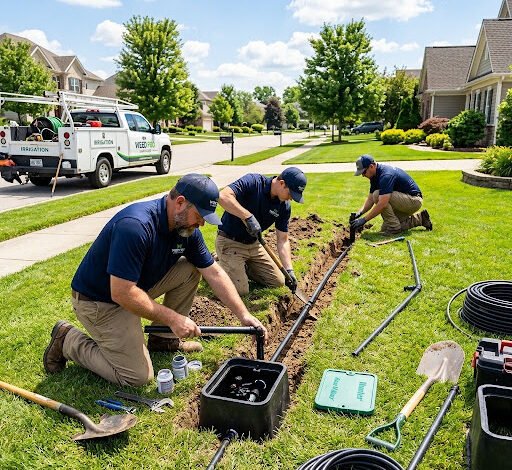
Weed Pro Lawn Care designs and installs systems built for long-term performance. The equipment is commercial-grade, the installation is clean, and the setup is tailored from the start. There’s no one-size-fits-all approach here—just a system that works for your property.
How Poor Irrigation Quietly Damages Your Lawn
Overwatering is one of the most common—and most overlooked—causes of lawn decline. It drives away oxygen from the root zone, creates ideal conditions for fungal disease, and wastes thousands of gallons every season. Underwatering causes stress, thinning, and bare patches that weeds are quick to exploit.
A poorly configured system doesn’t just waste water. It wastes money, weakens the lawn’s defenses, and often leads to expensive repair work down the line. Fixing an inefficient irrigation setup after the damage is done costs far more than getting it right from the beginning.
The Real Benefits of a Well-Designed Irrigation System
When irrigation is done right, the results go beyond a greener lawn. Here’s what a properly installed system actually delivers:
- Consistent root development — Roots grow deeper and stronger when they receive steady, measured moisture rather than irregular soaking.
- Lower water bills — Smart scheduling and zone-specific delivery eliminate waste, so you’re only using what’s actually needed.
- Fewer weeds — Targeted watering feeds the grass, not the bare soil where weeds germinate.
- Disease prevention — Controlled moisture reduces the humid surface conditions that fungal diseases thrive in.
- Time savings — Automated systems handle watering on a schedule, so you’re not out there with a hose every other day.
These aren’t minor perks. They add up to a lawn that’s visibly healthier and significantly easier to maintain season after season.
What to Expect From Weed Pro Lawn Care’s Irrigation Service
Every project starts with an assessment. The Weed Pro team evaluates the yard’s layout, slope, and plant zones before designing a system that fits the property rather than a generic template.
Irrigation Company services from a trusted, experienced provider mean your lawn gets a custom-designed watering system built to deliver consistent results across every section of your yard, from the front curb to the back fence, protecting your investment for years to come.
Installation is handled efficiently, with minimal disruption to your property. Once the system is in place, Weed Pro’s team walks you through how it works—covering scheduling, zone adjustments, and seasonal settings—so you’re confident managing it going forward.
Seasonal maintenance is also available to keep the system running at its best. That means checking for clogged heads, adjusting spray patterns as plants grow, and winterizing the lines before temperatures drop.
Is Now the Right Time to Install an Irrigation System?
Spring and early summer are the most popular times for irrigation installation, and for good reason. Getting a system in place before peak heat means the lawn is properly supported through the most demanding months of the year.
That said, fall installations have real advantages too. Cooler temperatures make the installation process easier on both the crew and the lawn, and the system is ready to go from the first warm day of the following season.
Whenever you’re ready, earlier is almost always better than waiting until the lawn is already showing stress.
A Greener Lawn Starts With the Right Water
Grass that’s consistently green, dense, and resilient doesn’t happen by chance. It’s the result of reliable moisture delivered at the right time and in the right amount. That’s exactly what a professionally installed irrigation system provides.
Weed Pro Lawn Care brings the expertise, equipment, and attention to detail that turns an average lawn into one that stands out—not just in summer, but all season long. Reach out today to schedule your irrigation consultation and see what a difference the right system can make.